
AI workflow design for lean teams starts with one repeatable job: what arrives, what needs interpretation, who can approve a change and how completion is confirmed. Use AI for the ambiguous part, ordinary rules for predictable steps, and a visible review path for exceptions. The aim is less manual coordination without adding an unmanageable system.
Start with one job your team repeats
For a lean team, an automation project should remove a specific burden without creating a second job maintaining the automation. Name the input, the person currently handling it, the decision they make and the record that proves completion. “Automate operations” is too broad. “Prepare inbound requests for the right owner, with their source and unresolved questions attached” is a scope you can inspect.
Before adding AI, check whether a form improvement, saved view, native integration or deterministic rule solves the problem. A language model is useful when a step needs interpretation of variable text or documents. It is unnecessary for copying a known field, comparing a deadline or routing an exact status. Mixed workflows can use both without making every step an AI decision.
Use the workflow library to identify triggers, states and ownership. If nobody can explain what a good result looks like or handle exceptions, clarify that operating agreement first. The team does not need a perfect process map, but it needs someone empowered to resolve the cases that software cannot settle.
Separate interpretation from permission to act
A practical architecture has five boundaries: receive the job, interpret only the ambiguous part, validate the proposal, authorize the action, then confirm the destination accepted it. Keep the language model's suggestion separate from the code that changes a record or contacts a customer. A well-formed suggestion does not grant permission to execute it.
For example, extraction can propose a request category and a possible customer reference. Application rules then check whether that customer exists, whether the match is unique and whether the acting service has access to the record. Unknown or conflicting matches remain unresolved. Do not let a prompt invent an account ID to make the next step convenient.

Use a durable job identifier and a small state model such as received, needs review, ready, dispatching, confirmed and unresolved. Record transitions and relevant software versions. Restrict access to source material and define retention; tracing a failure is not a reason to copy every private document into general-purpose logs. Our agent versus workflow comparison explains when a more open-ended execution model needs additional controls.
Validate meaning, not just JSON
A schema checks the shape of a response: required fields, types and supported constraints. It cannot establish that a plausible invoice amount, date or identifier came from the right source. Treat structural validation as one gate, then add source comparison, arithmetic checks where relevant, authoritative lookups and explicit handling for absent values.
Ask for an unknown result instead of a guess when the evidence is missing. Keep a reference to the supporting passage or document region so a reviewer can inspect the claim. Source references themselves also need checking. A generated quotation or page number is not automatically evidence.
Anthropic's structured-output documentation describes schema-constrained responses and SDK validation. Those format controls are useful, but the application still needs business-specific checks. Test refused, incomplete, oversized and malformed results as well as the expected response. The safe outcome for a failed check is a visible unresolved job, not silent field substitution.
Worked example: prepare requests without sending unchecked replies
This is an illustrative design scenario, not a client case or a measured YAS result. Imagine a small service team receiving requests in a shared inbox. One person reads each message, finds the customer record, asks colleagues who owns the topic and copies a summary into the CRM. The first version can prepare that handoff without automating customer commitments.
- Receive: store an approved message reference and a stable job ID. Detect repeated intake of the same message.
- Interpret: propose a category, a short summary and missing information. Treat message content as untrusted input, never as instructions to grant tool access.
- Verify: match the customer against authorized records. Multiple matches, unsupported claims or missing identifiers go to review.
- Assign: use maintained rules to propose an owner. If no rule applies, leave the request in the shared exception queue with a responsible person.
- Confirm: write the approved internal record and verify its destination reference. Keep customer replies manual in this first scope.
Test an ordinary request, an unknown customer, a duplicate message, a misleading instruction in the body and a timeout after the CRM write. Acceptance means each case reaches the intended state with its context intact. It does not mean every message is processed automatically. If the team already has reliable inbox routing and only needs a clearer form, this custom build may not be justified.
Make review possible for the team you actually have
Define review rules around consequences and evidence: unknown matches, conflicting values, restricted operations, changed payment details or an action outside the approved scope. A model's self-reported confidence is not a calibrated probability. If a classifier score is used for routing, evaluate its threshold against labelled examples and the cost of mistakes; do not use it as the sole authorization for consequential actions.
A useful review screen shows the source, proposed change, failed checks and the allowed next actions. Include correct, reject, request information and defer where the process needs them. Record who approved which version. Approval of an earlier draft must not silently authorize a later changed payload.
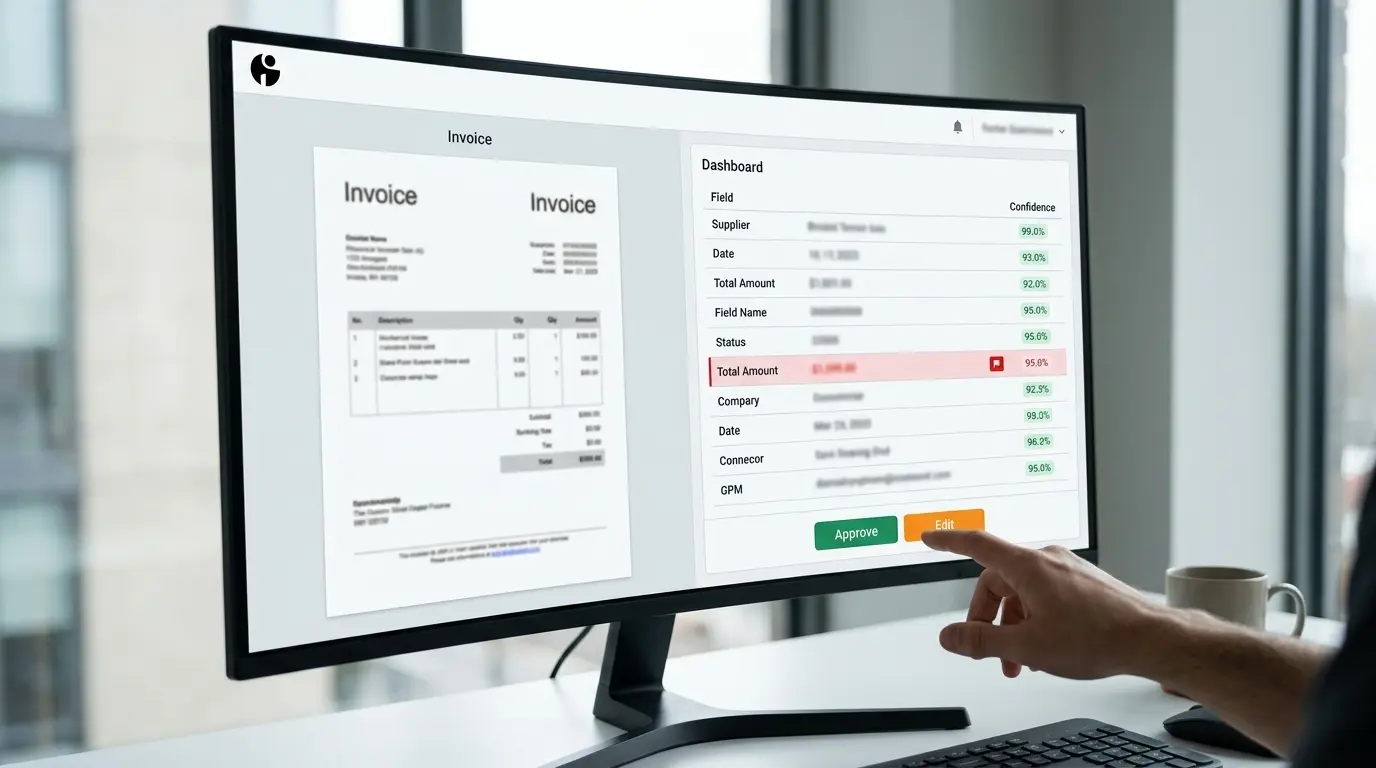
Plan for the owner's absence and the queue's capacity. Who sees an overdue case? Can ordinary work continue while one case waits? When should new automated intake pause? Without these decisions, “human in the loop” simply moves an invisible backlog from the inbox into a new interface.
Design for failures and uncertain outcomes
Separate failures that are safe to retry from invalid input, denied access and uncertain external writes. Use bounded retries with delay for eligible transient failures. Do not retry indefinitely or turn a permission error into a request to a more permissive account.
A timeout after sending a write does not tell you whether the destination applied it. A stable key helps only when the destination supports the relevant idempotency contract and the request respects its scope and lifetime. Otherwise, use a destination lookup or reconciliation step and escalate uncertainty before repeating an irreversible action. AWS explains the contract behind safe retries; adding a key locally is not an end-to-end delivery guarantee.
A second model provider is not an automatic safety net. It can differ in behavior, data handling and supported output format. Evaluate and authorize it before using it as a fallback. For a small first release, retaining the job for manual handling may be simpler than maintaining a second provider and another set of tests.
Measure the whole job, including review
Record the current volume, hands-on time, waiting time, correction rate and missed cases before the pilot. Compare similar categories of work afterwards. Include time spent checking outputs, resolving exceptions and maintaining the integration. A fast extraction step can still make the overall process slower if reviewers must reconstruct missing context.

Use a small scorecard: jobs received, jobs confirmed, unresolved jobs, oldest unresolved age, operator minutes and running cost. Separate customer outcomes from internal completion signals. A queued email is not proof that the customer read it; a CRM record is not a qualified sale. Investigate changes in error rates alongside any reduction in manual work.
Agree what would justify expansion, adjustment or stopping before the pilot begins. Savings depend on actual workload and review cost, not the presence of AI. Our workflow cost guide helps frame setup, integration and ongoing operation as separate costs.
What a turnkey YAS implementation should define
YAS builds scoped AI automation around a recurring business task. The first conversation should establish the current bottleneck, tools, approximate volume and responsible owner. From there, we can assess whether configuration, an existing connector or custom development fits. Integration depends on the access and capabilities actually available; not every legacy tool exposes a usable API.
A proposed implementation should specify supported inputs, approved actions, integrations, review rules, acceptance examples, deployment responsibilities and recovery procedures. Handover should name who owns access, operating instructions and unresolved work. Agree maintenance and support separately rather than assuming an indefinite service is included in a build.
See the public AI automation examples for available evidence, and keep those examples separate from the illustrative inbox scenario above. To discuss AI automation under one implementation scope, describe one process and where it gets stuck. No credentials or customer records are needed for that initial inquiry.
When not to build yet
Pause when the process changes faster than the team can describe it, nobody owns exceptions, required access is unavailable or the workload is too small to support the operating cost. Improve the inputs or clarify policy first. A stable manual checklist can be a better first intervention than a custom system.
Do not begin with autonomous financial, contractual or other high-consequence actions simply because their manual handling is expensive. Start with preparation, comparison or a controlled internal update if that is where the evidence supports a useful scope. Expansion requires its own review; successful testing of one workflow does not authorize unrelated actions.
A first-release checklist
- Choose one recurring job and an accountable owner.
- Compare a process change or existing-tool setup with a custom build.
- Identify necessary data, authorized access and retention limits.
- Separate model interpretation from validation and action permissions.
- Define normal, missing-data, duplicate, review and uncertain-delivery cases.
- Test representative approved examples without allowing unintended external actions.
- Agree acceptance criteria, operator instructions, recovery and support ownership.
- Measure the pilot against the manual baseline before widening the scope.
The useful outcome is a process your team can operate and inspect, not a diagram with more AI steps. Start with one bottleneck, make the boundaries explicit and expand only when the working version earns that next step.
Choose the lowest action level that can prove useful. Move to a wider boundary only when representative tests, review capacity and destination controls support it.

| Boundary | Use it when | Human control | Stop or step back when |
|---|---|---|---|
| Prepare only | Inputs vary or actions have material consequences. | Review every output before any external write. | Evidence is missing, conflicting or access is unclear. |
| Prepare and propose | Categories and acceptance rules are stable enough to test. | Review the exception queue and approve proposed changes. | Corrections cluster, queue age rises or rules keep changing. |
| Automatic action | Representative tests pass and the destination supports a safe reversible or idempotent write. | Sample completed work and assign an exception owner. | The outcome is unknown, permissions drift or reconciliation fails. |

FAQ
Does a lean team need a custom AI workflow or an existing tool?
Start with the existing tool if its rules, permissions and exception handling cover the job. A custom workflow becomes worth evaluating when work crosses systems, requires evidence-backed interpretation or leaves costly handoffs that the current setup cannot handle. Compare the complete operating cost, not just the model subscription.
When should the workflow ask a person to review a record?
Require review for missing or conflicting evidence, unknown record matches, restricted actions and policy exceptions. Keep financial or other consequential decisions behind the agreed authorization boundary. A model's self-reported confidence is not an approval rule; any scoring threshold needs evaluation against representative labelled cases.
Does a valid JSON response prove that extracted data is correct?
No. A schema can check structure, required fields and supported constraints. A plausible but wrong amount, date or account identifier can still pass. Compare values with the source and authoritative records, allow an unknown result, and stop unauthorized downstream actions.
How should a small team measure whether the workflow is worthwhile?
Compare similar work before and after the pilot: time spent processing and reviewing, waiting time, corrections, missed cases and operating cost. Include setup, maintenance and operator time. A higher automatic-processing rate alone does not demonstrate better service or a positive return.
What happens if an API times out after a write?
A timeout can leave the outcome unknown. Use the destination's documented idempotency contract and status lookup where available. Reconcile the existing operation before retrying an irreversible action. Keep unresolved records visible to an owner rather than assuming that either success or failure occurred.
What should I send YAS to discuss an automation project?
Describe one recurring task, the tools involved, approximate volume, the current bottleneck and who owns the result. No credentials or customer records are needed for the initial inquiry. We can then clarify access constraints, a bounded first version, acceptance checks and what would need to be agreed before implementation.